
If you run growth or build automations, AI jargon can slow you down. This glossary explains the 2025 terms that actually matter, with quick “why it matters” notes and simple examples you can copy into your stack.
We kept it practical, marketing-first, and link out where a deeper read helps.
Who this is for
Founders validating offers, building pipeline, and automating ops
B2B marketers shipping content, ads, and outbound at scale
Teams using tools like OpenAI, Anthropic, Google, LangChain, LlamaIndex, n8n, Zapier, Make, Clay, Instantly, HubSpot, Segment
Core model concepts
Large Language Model (LLM)
A model trained to predict text. You prompt it; it produces tokens one by one.
Why it matters: Most “AI features” you use are an LLM under the hood.
Small Language Model (SLM)
A compact model tuned for narrow tasks, faster and cheaper than big models. Think on-device, real-time, or high-volume workflows. Google’s Nano line is a common example. Use SLMs for routing, classification, or light rewriting, then call a larger model only when needed.
Function Calling / Tool Use
Let the model ask your software to “call” a function: fetch a CRM record, hit an API, run SQL, or trigger n8n. This turns static chat into workflows. See OpenAI’s docs for schemas and safety notes.
Structured Outputs (JSON / Schemas)
Force the model to return clean JSON that fits a schema. Useful for lead extraction, tagging, or passing data between steps.
Embeddings
Numeric vectors that represent meaning. You index them in a vector database to find “similar” content. Great for search, dedupe, audience clustering, and RAG.
Vector Database
Stores embeddings and returns nearest neighbors. Pinecone’s primer is a clear overview. Use one when keyword search starts missing intent.
Retrieval & knowledge
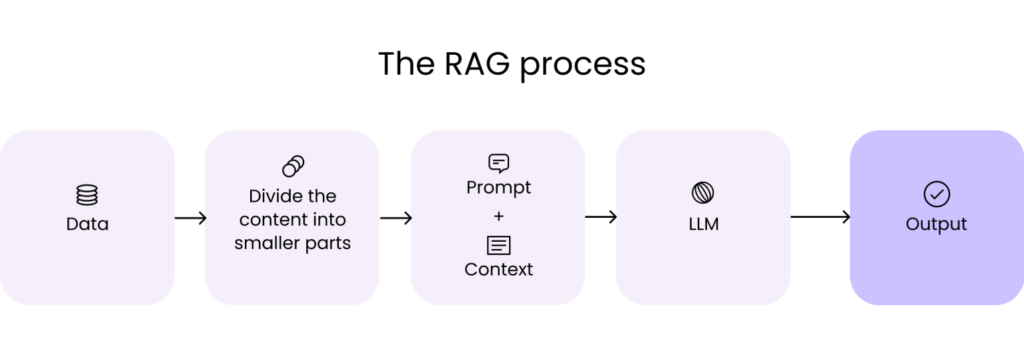
RAG (Retrieval-Augmented Generation)
Before the model writes, retrieve relevant docs and feed them in. This reduces hallucinations and keeps content on-brand. See NVIDIA’s and AWS’s guides for modern patterns.
GraphRAG / Knowledge-Graph RAG
When your facts are relational (people→companies→events), build a graph and retrieve paths, not just passages. Helpful for account mapping and multi-hop answers. Active research continues in 2025.
Long Context
Bigger “memory” windows let models read more. Still, retrieval beats dropping an entire knowledge base into one prompt. Use long context for short-lived sessions; use RAG for repeatable systems.
Agents & automation
AI Agent
A loop that plans, calls tools, observes results, then decides the next step. Think “autopilot for tasks” with clear guardrails. Use agents for research, enrichment, QA triage, and multi-step ops.
Agent Orchestration (LangGraph / AutoGen)
Frameworks to coordinate one or more agents with tools, memory, and state. LangGraph focuses on graph-style control over steps; AutoGen explores multi-agent patterns. Helpful once simple prompts turn into processes.
Event-Driven Automation
Trigger AI when something happens: a form fill, Stripe payment, webhook, or CRM update. Tools like n8n, Zapier, and Make route data between AI and your apps.
Shipping to production
Eval & Observability
Treat prompts like code. Log prompts/outputs, score quality, and track regressions. Start with lightweight suites like Langfuse for tracing and dashboards. For RAG, use RAGAS to score faithfulness and answer quality.
Safety & Abuse Risks
Prompt injection, data exfiltration, and unsafe tool calls are real. The OWASP Top 10 for LLMs is the best plain-language checklist to bake into reviews.
Latency & Cost Controls
Use a cheap classifier or SLM to route only “worthy” requests to a bigger model. Cache frequent answers. Batch embeddings. Stream responses for UX.
Marketing & growth terms you’ll see a lot
Personalization at Scale
Generate copy that references firmographics, tech stack, and triggers. Clay + an LLM is the current standard for B2B. Use structured outputs to fill sequences and landing blocks cleanly.
Agentic Outbound
Combine tracking signals (ad views, site visits, LinkedIn engagement) with an agent that decides: enrich lead → pick angle → draft email → queue in Instantly or Smartlead → wait for reply → route to CRM.
Creative Variants
Use models to produce on-brand variations of hooks, visuals, and CTAs, then A/B test. Keep a human in the loop for brand and claims.
Knowledge Guardrails
Limit generation to your approved content via RAG, and ask the model to cite sources. This reduces risky claims in ads and blog posts.
The glossary (A→Z, quick and useful)
Agent – A loop that plans, calls tools, observes, and repeats. Great for multi-step tasks.
Agent Orchestrator – Framework that manages agent steps and state (LangGraph, AutoGen).
Alignment – Steering models to follow your policies and brand. Includes RLHF and policy rules.
Embeddings – Vectors for meaning; used for search, clustering, and RAG.
Eval – Automated checks on quality, safety, and latency; critical for regressions.
Function Calling – Models output a function + arguments; your code executes it.
GraphRAG – Retrieval with knowledge graphs for multi-hop facts.
Guardrails – Constraints and policies that block risky outputs or actions. See OWASP LLM Top 10.
Hallucination – Confidently wrong output. Reduce with retrieval, citations, and “don’t know.”
JSON / Structured Output – Enforce schema-clean data for downstream steps.
Long Context – Larger windows reduce chunking, but retrieval still wins for scale.
Memory – Short-term: conversation state. Long-term: persisted facts in a store or vector DB.
Observability – Traces, metrics, and logs for prompts and tools (Langfuse).
Prompt Injection – Malicious text that hijacks instructions. Sanitize inputs and limit tool scopes.
RAG – Retrieve relevant docs, then generate grounded answers.
Routing – Send easy requests to a small model, complex ones to a larger model. Saves cost.
SLM – Small, fast models for specific jobs; good for routing and classification.
Vector DB – Store and query embeddings with fast nearest-neighbor search.
FAQ
Do I need agents for everything?
No. Start with simple flows: structured outputs + a few tools. Add an agent only when branching logic and retries become painful.
RAG or fine-tuning?
If your issue is knowledge, choose RAG. If your issue is tone or task style, consider fine-tuning after you’ve tried prompt + examples.
Is GraphRAG worth it yet?
Use it when relationships matter (org charts, account maps). Otherwise, classic RAG with re-ranking is simpler.
Want this glossary wired into a working system? We’ll map your stack, pick the right patterns, and ship a repeatable AI workflow in weeks. Book a free Growth Systems Audit.